Digital specialists for small and mid-sized businesses
Short-staffed?Hire digital.
Digital specialists take on incoming mail, invoice checking, quotes and customer service. Each one has a clear job description, knows your company knowledge and works on your own computer or server. Whatever leaves your business, you approve.
DenkraumShared company knowledge of all specialistsCompany handbook v12Price list 2026SuppliersReply templatesCustomers & cases
Example business. The company and people are made up.
The team
Six specialists for office, accounts, sales and service.
Every digital specialist fills a position that already exists in your business. It brings its own workflows. You add your rules, prices and text templates.
OfficeDF-01
Specialist for Incoming mail (digital)
Tasks
Sorts emails, scans, receipts and call notes
Picks out details such as amount, due date and sender
Turns each item into work: an invoice, enquiry, ticket or task
Tools
MailboxesMicrosoft 365GmailScan folder
Authority
Level 1 · Read & sort
Approved by
Office manager
Full job profile
Knowledge
Your categories and if-then rules, tested in a dry run first
Working hours
Whenever something arrives
Must not
Send replies. Uncertain and confidential items such as job applications go to you.
Estate agent assistantBrochures, viewings, from listing to completion
Your position is missing? As a custom specialist we set up your own workflows, including connections to your ERP or industry software.
How we define a specialist
One position. Six details.
Every digital specialist is described like any other position in your business. Anyone who reads the job profile knows what it does, what it may do and who checks its work. Behind every detail sits a building block in DENKRAUM AI.
Job profileDF-02 · Brandt Haustechnik · as of 10/2026
Specialist for invoice checking (digital)
DetailIn the job profileIn DENKRAUM AI
Tasks
Check incoming invoices and prepare payments: amount, due date, IBAN, early-payment discount and duplicates.
Agent with instructions, plus workflows
Knowledge
Suppliers, payment terms and approval limits from the company handbook.
Knowledge space with version and source
Tools
Invoice mailbox, XRechnung and ZUGFeRD, SEPA file, DATEV export.
Tools and connections
Authority
Level 3. Prepares payments, which are only made after approval.
Tool permissions and approval step
Approved by
Sandra Keller, accounts. Above €1,000 also Jana Brandt.
Approval with comment and log
Working hours
With every incoming invoice. On Fridays at 10 am the week’s payment proposal arrives.
Triggers and schedule
How it looks in DENKRAUM AIThe quotes specialist in the chat: task, project, tools and knowledge at a glance. Original view, sample data made up.
Why a job profile?
Every manager understands it.Every business knows job descriptions. Nobody needs to know what an agent, a workflow or a prompt is.
All specialists are built the same way.Six details, always in the same order. You compare positions at a glance and see where an approval is missing.
No made-up name, no avatar.The specialist is named after its position. Looking for an invoice? Ask invoice checking. You can still give it a nickname.
Clearly marked as AI.“(digital)” is part of the title, so everyone on the team knows when AI did the work.
Changes stay simple.New approval limit, new schedule, new price list: you change one detail, not the technology behind it.
Control
Three levels of authority. You have the final say.
Just as with new colleagues, you decide what a specialist handles on its own and what it brings to you.
Level 1
Read & sort
Reads post, receipts and enquiries, picks out details and files them. Uncertain and confidential cases go to you.
For example: incoming mail
Level 2
Draft & calculate
Writes replies, prices quotes, suggests new knowledge. Everything stays a draft until someone checks it.
For example: quotes, prospecting, knowledge
Level 3
Act after approval
Sends from your mailbox, creates the payment file, adds knowledge. Only after your click, and with four eyes above a set amount.
For example: invoice checking, customer service
Nothing leaves your business without approval.
Never decided alone
Payments
Quotes and messages to customers
HR matters such as applications
Legal and tax assessments
Changes to company knowledge
Pending approvals in DENKRAUM AI: the workflow waits until the responsible person approves or rejects, with a comment if needed. Original view, sample data made up.
Security & data protection
Your data stays with you. The AI works by your rules.
Digital specialists work where your data already is: on your own computer or server. We designed them with GDPR data protection and the duties of the EU AI Act in mind from the start.
GDPR
Your data stays in-house
The Denkraum runs as a desktop app on a Windows computer, on your office network or on your own server. Company knowledge, cases and logs stay with you, not with us, readable as Markdown and exportable at any time.
Local AI
AI on your own network
With local models, for example via Ollama or vLLM, AI processing stays on your own network too. You only use cloud models from Anthropic or OpenAI if you want to. Their terms then apply.
Art. 28 GDPR
Data processing agreement
If we access your Denkraum during onboarding or support, or if you use cloud models, we cover that in a data processing agreement. You receive the documents with the quote.
EU AI Act
Transparency and human oversight
Every specialist has “(digital)” in its title, so AI work is clearly recognisable. A person makes the decisions: approvals per position, with four eyes above a set amount. Learning videos in the app build your team’s AI literacy.
Evidence
Every step logged
All runs appear in the activity log, and answers name the source and version of the knowledge. The job profile shows what a specialist does, what it may do and who approves. That helps when you consult your data protection officer and works council.
Permissions
Roles and rights
Each person gets a role, from admin to reader, with access per knowledge space. Each specialist only has the tool permissions of its position and never decides personnel matters such as job applications on its own.
And this website? It sets no tracking cookies, embeds no third-party services and, like our enquiry inbox, runs on servers in Germany. More in the privacy notice.
Whether a particular use meets the requirements of the GDPR and the EU AI Act depends on the data you process, the models you use and the purpose. We clarify this in the intro call, gladly with your data protection officer.
One Denkraum for all
All specialists share one body of company knowledge.
Your specialists work in the same Denkraum, your shared workspace. That is where your handbook, prices, customers and cases live. What customer service learns, the quotes specialist knows too, once you have approved it.
Onboard onceYou keep rules, price lists and text templates in one place. Every further specialist uses them too. That’s why it costs less.
Knowledge growsNew solutions and corrections are recorded as suggestions. Your team approves them, then they apply to everyone, with version and source.
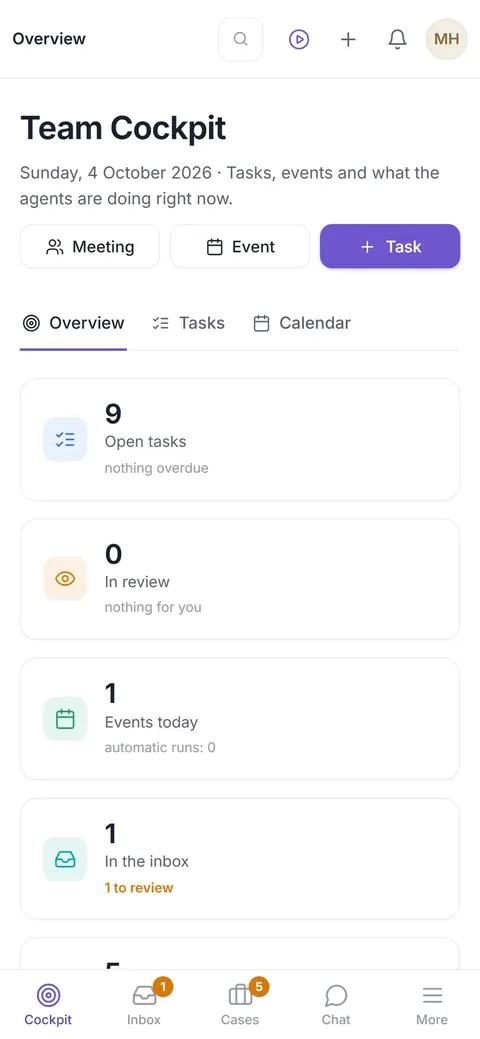
One cockpit for the whole teamThe team cockpit shows tasks, appointments, incoming items and what your specialists are doing right now. On your phone too.
One provider instead of silosBuy orders, receipts and customer service from three providers and you look after three contracts and three versions of your knowledge. In the Denkraum there is one.
Team cockpit in DENKRAUM AI on desktop and phone, original views. The sample data is made up.
Before you decide
Eight questions to ask any provider of digital employees.
Plenty of providers now offer digital employees. These questions quickly show what an offer is worth day to day. Ask every provider, including us.
Question
What matters
Digitale Fachkraft
What does the second position cost?
If every role is charged in full, you pay for the same company knowledge several times over.
Less than the first.€149 instead of €199, because it shares knowledge and connections.
How are AI costs handled?
Flat rate, fair use or budget: the rule should be clear and the same everywhere.
In one place, clearly. With a local model there are none. Cloud models at cost, with no mark-up.
Are you billed per email, document or minute?
Quotas with extra charges make costs hard to plan, especially in busy months.
No. A fixed price per position, with no meters for emails, documents or cases.
Where do my data and the AI run?
“Hosted in the EU” does not say with which provider or which AI model.
On your computer or server. With a local model, the AI can stay on your own network too.
Who approves before anything goes out?
Approvals should be set per position, with names and amount limits, not across the board.
A named person per position. Plus three levels of authority and four eyes above a set amount.
Can I see what the specialist is doing right now?
What counts is a view of your real cases, not sample figures.
Yes. In the team cockpit and the log, every step with time, source and approval.
Do I see results before I pay?
A trial run with real cases shows more than any demo.
Yes.14 days’ probation, then the performance report. You only pay for onboarding if you stay.
Do I keep my company knowledge if I leave?
Knowledge in closed systems is lost when you switch provider.
Yes. It is stored as Markdown and can be exported at any time. Cancel monthly, or buy a licence with source code.
Pricing
You pay per position. Each additional one costs less.
Company knowledge, cockpit, approvals and every user on your team are included. From the second specialist on you pay less, because it works in the same Denkraum.
Included in every position
Denkraum with company knowledge, team cockpit, approvals and log
Any number of users in your company, with roles from admin to reader
Desktop app, access on the office network and phone app
Templates, workflows and short learning videos in the app
No meters for emails, documents or cases
Not included, stated openly
The computer or server the Denkraum runs on
Costs for cloud AI models, if you use them. You pay them at cost, with no mark-up, directly to the provider or through us. With a local model there are none.
Individual connections to ERP or industry software, as a custom specialist on request
Your own agents and workflows beyond your positions, as a custom specialist or with DENKRAUM AI
Several companies or locations, with a separate offer
Licence purchase
Prefer to buy rather than rent?
You can buy your positions at any time, with source code. The software is then yours and keeps running without us.
Price
A one-off 30 times your monthly price. For the three example positions that is €14,910.
Included
A perpetual licence for your company and the source code of your specialists and of DENKRAUM AI in the version you buy. You may adapt it in-house; passing it on or reselling it is not allowed.
Updates and support
Included in the first year. After that, optional at 20% of the purchase price per year, cancellable annually. Without a contract, your version keeps running unchanged.
From renting to buying
Switch within the first 12 months and we credit 50% of the monthly fees you have paid towards the purchase price.
Hiring
How your first specialist gets started.
45 minutes
Intro call
We go through your workflows and pick the position that gives your team the most time back.
Template and handbook
Onboarding
We set up the specialist from a template, connect mailboxes and fill the company handbook with your rules, prices and text templates.
14 days, free
Probation
The specialist works on real cases. Everything comes to you for approval, and every step is logged.
Before the first invoice
Performance report
You see in black and white what was done and what was approved. Then you decide. You only pay for onboarding if you stay.
This is what the performance report looks like.
At the end of the probation you get one page per position: what was done, what you approved or corrected and what didn’t work. The figures come from your Denkraum’s log.
Corrected: 5 suggestions. 3 corrections are now in the company handbook.
Didn’t work: 2 scans were illegible and were entered by hand.
Time to approval: 3.4 hours on average.
FAQ
What managing directors want to know first.
Does a digital specialist replace employees?
It takes over routine work within a position: sorting, reading, calculating, drafting. Decisions, approvals and personal contact with customers stay with your team.
What happens if a specialist makes a mistake?
Until it is approved, everything is a draft. Uncertain cases are set aside for review, and every step is logged. If you like, you record a correction as knowledge so it is right next time.
Which AI powers the specialists?
You choose per task: cloud models, for example from Anthropic or OpenAI, or a local model via Ollama or vLLM. We work out which models suit the task and your hardware during onboarding.
Do we need our own server?
Not necessarily. The desktop app runs on a Windows computer in the office, and your team works along in the browser. For larger teams or local models, your own server is the better choice.
Can invoice checking handle e-invoices?
Yes. It reads XRechnung and ZUGFeRD without AI and spots duplicate invoices. Approved invoices go to online banking as a SEPA batch transfer and to your tax adviser as a DATEV booking batch. It does not issue e-invoices of its own.
How is this different from DENKRAUM AI?
DENKRAUM AI is the workplace with company knowledge, cockpit and approvals. A digital specialist is a fully set-up position within it, with tasks, workflows and authority. You book positions, and the Denkraum is included.
How long does onboarding take?
A template sets up workflows, specialist and company handbook in a few minutes. How long it takes to add your rules and prices depends on your documents. We agree the schedule in the intro call.
What happens after the probation?
You receive the performance report and decide. If you stay, onboarding becomes due and we bill monthly, cancellable at the end of any month. If you would rather buy than rent, the software is also available as a licence with source code, on these terms.
How many people can work with the specialists?
As many as work with them in your company: management, accounts, sales, temporary staff too. Each person gets a role, from admin to reader. One Denkraum covers one company; for several companies or locations we make a separate offer.
Why don’t you count emails or documents?
Because an extra case costs us nothing. The work runs on your computer or server, and we pass on cloud AI costs without mark-up. So you pay the same in busy months as in quiet ones.
Do we need a data processing agreement?
If the Denkraum runs on your computer or server, the data stays with you. If we access it during onboarding or support, or if you use cloud models, we cover that in a data processing agreement. You receive the documents with the quote.
Can we use it in line with the GDPR?
The groundwork is in place: your data sits on your own computer or server, with a local model the AI stays on your own network too, and a data processing agreement covers access during onboarding and support. Whether your particular use fits depends on the data you process and the models you use. We clarify this in the intro call, gladly with your data protection officer.
What about the works council and the EU AI Act?
The job profile shows exactly what a specialist does, what it may do and who approves. The log records every step. Both help when you consult your works council. For your team’s AI literacy, a topic of the EU AI Act, there are short learning videos right in the app.
Intro call
Which position shall we fill first?
In 45 minutes we go through your workflows and show you the right specialist using your own example. No obligation.