Job ad · DF-01 · Office
Specialist for Incoming mail (digital)
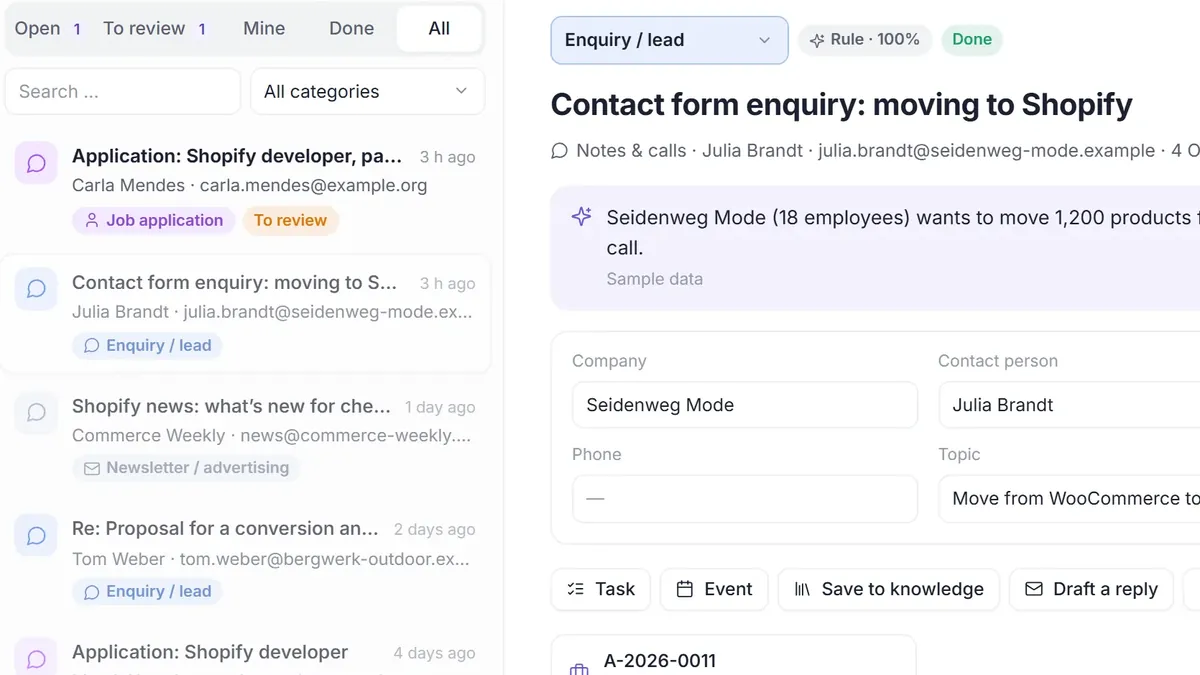
It reads everything that reaches you: emails from your mailboxes, scans, receipts and call notes. It picks out details such as amount, due date and sender and turns each item into work for the right position. Uncertain and confidential items go to you.
- €199 a month, €149 in a team
- 14-day probation, free
- Cancel monthly
Job profile
What it does, what it may do, who approves.
The position is described like any other in your business. Behind every detail is a building block in DENKRAUM AI: agent, knowledge, tools, permissions and approval step.
- Tasks
- Sorts emails, scans, receipts and call notes
- Picks out details such as amount, due date and sender
- Turns each item into work: an invoice, enquiry, ticket or task
- Tools
- MailboxesMicrosoft 365GmailScan folder
- Authority
- Level 1 · Read & sort
- Approved by
- Office manager
- Knowledge
- Your categories and if-then rules, tested in a dry run first
- Working hours
- Whenever something arrives
- Must not
- Send replies. Uncertain and confidential items such as job applications go to you.
The position in detail
What arrives in the inbox
- Emails from your mailboxes, connected via IMAP, POP3 or Zoho, and Microsoft 365 and Gmail via OAuth
- Uploaded documents and files from a scan folder
- Receipts your team photographs with the mobile app
- Forms and call notes
Your rules first, then the AI
- Each item is sorted by your rules first, then by the AI model.
- Your categories describe what can arrive, from a lead to an invoice. Along the way it picks out details such as amount or due date.
- You test if-then rules in a dry run before they apply.
- Job applications and other confidential or uncertain items are set aside for review, and a person sorts them.
Every item becomes work
Once you confirm the classification, a case is created. Invoices go on to the specialist for invoice checking, enquiries become leads for prospecting, customer messages become tickets for customer service. Any item can also become a task, an appointment or a note in your knowledge.
How it works
Step by step.
During onboarding we connect your mailboxes and, if you like, a scan folder.
You define categories: what can arrive and which details should be picked out.
Your rules run in a dry run first. Then they apply.
Each day you check what has been set aside for review. Everything else is already sorted.
Hiring
Probation first, then you decide.
- Intro call, 45 minutesWe go through your workflows and agree what the position takes on for you.
- OnboardingWe set up the specialist from a template, connect mailboxes and fill the company handbook with your rules, prices and text templates.
- Probation, 14 days, freeThe specialist works on real cases. Everything comes to you for approval, and every step is logged.
- Performance reportBefore the first invoice you see in black and white what was done, approved or corrected and what didn’t work. Then you decide.
Questions
What you should know about this position.
Which mailboxes can the specialist read?
Mailboxes via IMAP or POP3, Zoho, and Microsoft 365 and Gmail via OAuth. On top of that come uploaded files, a scan folder and photos from the mobile app.
Does it answer emails itself?
No. It sorts items and creates cases, but it does not send replies. Drafts come from positions such as customer service, and nothing is sent until you click.
What happens to job applications and confidential post?
They are set aside for review and sorted by a person. You decide where the Denkraum and the AI processing run. With a local model, the AI stays on your own network too.
In the same Denkraum
Works together with these specialists.
All specialists share one body of company knowledge. What one position learns, the others know too, once you have approved it.